


Tuner & Metronome
4.53.80K Reviews
App Specs
- Version
- Varies with Device
- Updated On
- License
- Free
- Downloads
- 10,000,000+
- Developer
- Soundcorset Tuner
- Categories
- Music & Audio
- Platform
- Android, iOS
Screenshots
 Analysis by AppCompare
I like music tools that get out of the way quickly: when I pick up an instrument, I want to check my tuning or set a pulse without turning practice into a technology project. Tuner & Metronome is built around that practical idea. It brings familiar practice essentials together in one place, with extra tools for people who want more than a pitch reference and a steady click.
Quick checks, not a complicated setup
For a short session, the appeal is speed of access. I can open the app, move to the task I need, and get on with playing rather than searching through unrelated menus. That suits everyday habits: tuning before a lesson, finding a comfortable tempo for a scale, or checking a tricky passage before rehearsal. The design is meant to be approachable, though anyone who prefers a dedicated physical tuner or metronome may still find a separate device more direct.
The app is free to download, with optional in-app purchases ranging from $0.99 to $39.99 per item. That makes it easy to try the core experience before deciding whether any paid extras suit your routine. It is a music and audio app from Soundcorset Tuner, and its Teen content rating is worth noting for families choosing tools for a younger player.
Where an all-in-one practice tool helps
The main advantage of keeping a tuner and metronome together is not simply saving space. It makes it easier to move between two different kinds of attention. I might tune first, then switch to a slow pulse for a passage, and finally use the recording option to listen back. That sequence can turn a vague practice session into a more deliberate one: identify the issue, work on it, and check whether the result sounds steadier.
There is a useful trade-off here. A dedicated clip-on tuner can be convenient when a room is noisy, because it reads vibration directly from an instrument rather than relying on the surrounding sound. A phone-based tuner is handy when I want one pocket-sized tool for several instruments, but its results can be affected by nearby playing or general room noise. For a quiet room and a quick check, the app is a sensible option; in a crowded rehearsal, I would keep a clip-on tuner as a backup.
Making practice more intentional
One small habit that works well is setting a modest tempo before trying to play a difficult phrase at performance speed. A metronome is most useful when I treat it as a guide rather than a test: start slowly enough to play cleanly, then raise the pace only when the notes stay even. The visual beat is especially helpful when the click is hard to hear, and the different sound choices give me room to pick a cue that does not become irritating during repetition.
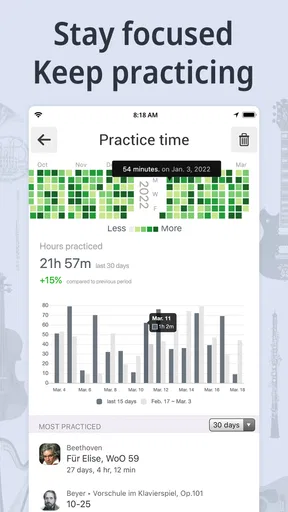
The timer can also help with focus, but I would use it to shape a session rather than as a measure of progress. For example, I can give a short block to tuning and warm-ups, another to a passage that keeps slipping, and a final block to playing through without stopping. That is more useful than leaving the app open while practicing without a clear goal. Recording a brief take at the end gives me something concrete to compare with the next attempt, although listening back works best when I focus on one question at a time, such as whether the rhythm is even or the ending stays in tune.
Worth Reading Before You Choose

Flipboard Shows What News Apps Must Do Beyond the Feed

Switching to Android Auto Means Rethinking Your Driving Routine

Google Calendar Makes a Crowded Week Easier to Manage

Ludo King Makes the Most of the Minutes Between Plans

Baby Panda World Brings Quick Play to Modern Phones, but Its Game Library Feels Busy

ESPN’s Live Game View Makes Following Close Games Easier
Who will get the most from it
I would recommend this kind of setup to beginners who want a straightforward practice companion, to students who need a tuner and beat reference between lessons, and to players who move among instruments and do not want a separate device for each basic task. It is also practical for a musician who practices in short bursts at home: open it, tune, work through a passage, and put the phone away.
It is less compelling for someone who needs a specialist tool for a narrow job. A player who depends on reliable tuning in a loud ensemble may prefer a vibration-based tuner. Someone who wants a metronome with a large physical control, a strong room-filling sound, or a screen that stays visible at a distance may be happier with dedicated hardware. And if you already use separate tools that do exactly what you need, the convenience of combining them may not justify changing your routine.
Getting Started with Tuner & Metronome
First things first, downloading Tuner & Metronome is a breeze. It’s available for both Android and iOS, so no worries if you’re an Apple aficionado or an Android advocate. Once installed, you’re greeted with a clean and straightforward interface. No frills, no fuss – just what you need to get down to business.
The app’s layout is intuitive, which means you won’t spend hours trying to figure out where everything is. You’ve got your tuner, metronome, and a few other nifty features all right at your fingertips. It’s like having your own little music toolkit in your pocket!
Using the Tuner
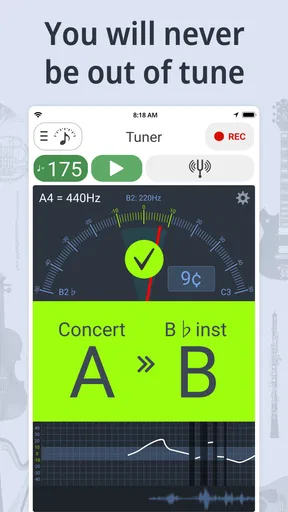
Let’s talk about the tuner first. Whether you’re strumming a guitar or blowing into a saxophone, getting the right pitch is crucial. The tuner in this app is pretty spot-on. It picks up sound quickly, and I found it to be quite accurate. The screen gives you a clear indication of whether you’re sharp or flat, and adjusting your instrument is straightforward. It’s not limited to just standard tuning either. You’ve got options for different instruments, which is a lifesaver if you’re a multi-instrumentalist.
Metronome Magic
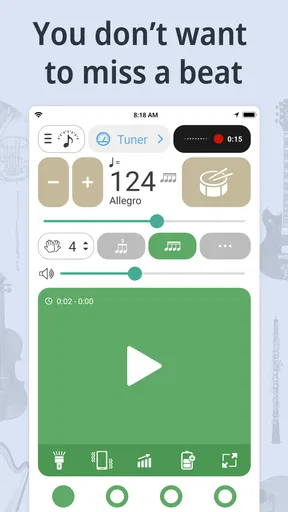
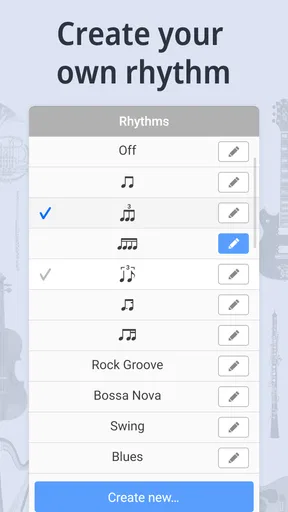
Now, onto the metronome. Keeping time is essential, whether you’re practicing scales or jamming with a band. The metronome feature is robust and customizable. You can adjust the tempo easily and choose from various time signatures. Plus, the sound options are a nice touch. I mean, who doesn’t love a bit of variety in their clicks?
What really stands out is the visual aspect. The metronome offers a visual cue, which is excellent if you’re in a loud environment and can’t quite hear the clicks. It’s like having a conductor waving the beat right in front of you.
Extras That Hit the Right Note
Beyond the basics, Tuner & Metronome offers some cool additional features. The recording option is a gem. You can record your practice sessions and listen back to catch those pesky mistakes you might miss in the moment. It’s a bit like having your own personal coach.
There’s also a practice timer, which is a game-changer if you tend to lose track of time while playing. Set your timer, focus on practice, and let the app remind you when it’s time to take a break. It’s these little things that make a big difference.
Final Thoughts
Overall, Tuner & Metronome is a delightful app for any musician, whether you’re just starting or you’ve been at it for years. It’s got the functionality you need without overwhelming you with unnecessary features. It’s reliable, easy to use, and a handy tool to have on your musical journey.
If you’re looking to streamline your practice sessions and ensure you’re always in tune and on time, give this app a spin. It’s like having your own little musical assistant, and honestly, who wouldn’t want that?
So, grab your instrument, download the app, and let Tuner & Metronome help you hit all the right notes. Happy playing!
Handling busy practice sessions
When I use a practice app repeatedly in one session, I care less about flashy extras than whether each tool remains easy to reach and whether I can recover my focus after a distraction. This app’s value is in having several jobs gathered in one place: I can move from tuning to tempo work and then review a recording without swapping between unrelated tools. That can make a quick evening session feel organized, especially when I have only enough time to tackle one passage.
A realistic routine might be a student arriving home, tuning a guitar in a quiet room, setting a slower beat for a difficult change, and recording one attempt before packing up. The practical tip is to record a short, specific passage rather than an entire practice session. A shorter playback is easier to assess: I can listen for timing, a missed note, or an uneven finish instead of trying to remember everything I played. If the phone is needed to follow sheet music at the same time, however, having the tuner or beat on that same screen may be inconvenient. A second device or a physical metronome can be the better choice for that workflow.
Reliability depends on the room and the routine
My confidence in a phone tuner is strongest when the instrument is close to the microphone and competing sounds are kept low. If other musicians are warming up nearby, I would pause for a quiet moment before relying on the reading. This is not a flaw unique to this app; it is a basic trade-off of using a microphone-based phone tool instead of a tuner that senses an instrument’s vibration. For a quick check at home, convenience wins. For a noisy rehearsal or a performance situation where a wrong reading is costly, a dedicated tuner is a sensible companion.
The metronome’s visual cue is a helpful fallback when sound is masked, but it does not remove every constraint. A phone needs to remain visible if I am following the visual pulse, and looking away from an instrument can interrupt concentration. I find it most useful when the device can sit within a natural line of sight. If I need a pulse audible across a room or want to keep my eyes on a conductor, a louder standalone metronome may suit me better.
As with any app used during practice, a notification or a call can break the flow. I try to prepare the session before starting: choose the tempo, place the phone where I can see it, and silence avoidable interruptions if that fits the situation. That small bit of planning matters more than expecting a phone to behave like a dedicated instrument accessory. The app is most convenient when the phone is already part of the practice setup, and less so when it must also handle every other task at once.
What to expect from the wider toolkit
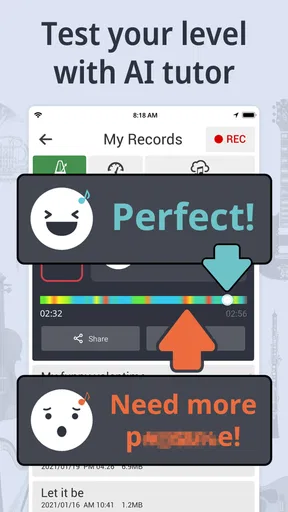
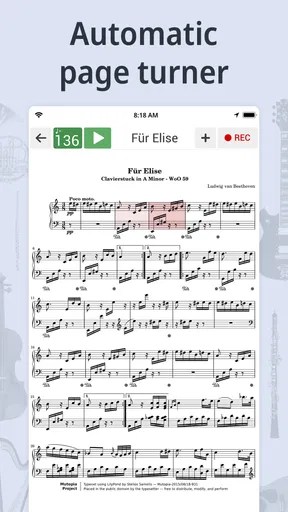
The app’s summary includes an auto page turner and A.I. tutoring alongside its tuner and metronome. Those additions may interest players who want practice support beyond pitch and pulse, but I would approach them as optional parts of a broader toolkit rather than assume they replace a teacher, a music stand, or a focused learning plan. The central everyday case remains simple: use the tuner to check pitch, the metronome to make timing deliberate, and the recording and timer tools to give practice a clear beginning and end.
Its reach is substantial, with over 10 million installs and an average rating of 4.6 from around 170,000 ratings. I read that as a sign that many people find the all-in-one approach useful, not as a guarantee that it will fit every instrument, room, or practice style. The app has been available since December 8, 2012, and its long presence in music and audio gives it a familiar, established role among phone-based practice tools. It is still worth trying it with your own instrument and surroundings rather than assuming a rating settles the question of accuracy for your needs.
My performance verdict
For the kind of practice where I need a quick pitch check, an adjustable beat, and a way to review a short attempt, I find this a practical phone companion. It avoids the friction of opening separate apps for basic tasks, and the visual metronome cue is a thoughtful option when sound alone is not enough. The best results come from using it deliberately: quiet the area for tuning, choose a tempo that supports clean playing, and make recordings short enough to review with purpose.
I would not make it my only tool in every setting. A noisy ensemble, a need for hands-free page control, or a preference for tactile controls can all make dedicated equipment a better fit. Device performance also depends on the phone: an older or busy handset may feel less responsive than a newer one, and keeping the screen visible for the beat can compete with reading music. I would close unrelated demands on the phone before a focused session, especially if I plan to record or use more than one feature in sequence.
Overall, this is a sensible choice for musicians who value convenience over specialist hardware. I would start with the free app, test the tuner in the room where I usually practice, and see whether the metronome and recording tools naturally fit my routine. If they do, it can replace several small, everyday steps with one accessible practice setup; if not, there is no need to force an all-in-one solution when a dedicated tuner or metronome serves the job better.
Pros
- User-friendly interface for easy navigation.
- Accurate tuning for a variety of instruments.
- Customizable metronome settings.
- Offline access for convenience.
- Supports multiple instrument types.
Cons
- Ads can be intrusive at times.
- Limited features in free version.
- Some advanced tools require purchase.
- Occasional lag on older devices.
- No direct support for sheet music.
FAQs for Tuner & Metronome
What is Tuner & Metronome used for?
Tuner & Metronome is a versatile app designed for musicians who need a reliable tool for tuning their instruments and practicing with a metronome. It provides accurate tuning for various instruments and a flexible metronome to help with timing and rhythm. It's especially beneficial for musicians looking to improve their practice sessions.
Is Tuner & Metronome suitable for all instruments?
Yes, Tuner & Metronome is suitable for a wide range of instruments including guitar, violin, piano, and wind instruments. The app offers multiple tuning modes and settings to accommodate different instrument types and player preferences, making it a versatile tool for musicians of any genre.
Can I use Tuner & Metronome offline?
Yes, Tuner & Metronome can be used offline. Once downloaded, the app does not require an internet connection to function. This allows musicians to use the tuning and metronome features anywhere, making it ideal for performance settings, practice sessions, and remote locations.
How user-friendly is the Tuner & Metronome app?
Tuner & Metronome is designed with user-friendliness in mind. The interface is intuitive, making it easy for both beginners and advanced users to navigate. Features are clearly labeled, and the main functionalities are easily accessible, ensuring a smooth experience for musicians focusing on their practice.
Are there any in-app purchases in Tuner & Metronome?
Tuner & Metronome offers a basic set of features for free; however, there are in-app purchases available for those who wish to access advanced functionalities. These may include additional tuning modes, metronome features, or ad-free usage, allowing users to customize their experience based on their needs.


